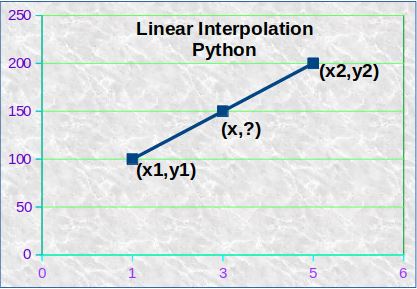
Linear interpolation is the simplest form of interpolation. It involves estimating the value of a function at a point using a straight line between two neighboring data points. For example, if we have two data points (x1, y1) and (x2, y2), we can estimate the value of the function at a point x within the range [x1, x2] as:
y = y1 + (x – x1) * (y2 – y1) / (x2 – x1)
This formula is based on the equation of a straight line (y = mx + b), where m is the slope of the line and b is the y-intercept. In this case, the slope is (y2 – y1) / (x2 – x1) and the y-intercept is y1.
Have a look at different interpolation techniques from my previous post-Interpolation Technique
Let’s say you have a data set that represents the number of website visitors per day for a particular website over a period of time. You want to estimate the number of visitors for a specific date that falls in between two dates for which you have actual visitor data.
Example
For example, let’s say you have the following data:
| Date | Visitors |
|---|---|
| 1 | 100 |
| 5 | 200 |
| 9 | 300 |
You want to estimate the number of visitors for the date 3.
Using linear interpolation, you can estimate the number of visitors for date 3 by calculating the value of visitors between the two data points that surround this date. The two data points we will use for linear interpolation are:
(x1, y1) = (1, 100) (x2, y2) = (5, 200)
Using the formula for linear interpolation, we can calculate the number of visitors for date 3 as:
Visitors for date 3 = y1 + (x – x1) * (y2 – y1) / (x2 – x1)
Substituting the values we have:
Visitors for date 3 = 100 + (3 – 1) * (200 – 100) / (5 – 1)
Simplifying the expression:
Visitors for date 3 = 100 + 2 * 100 / 4
Visitors for date 3 = 150
Therefore, the estimated number of visitors for date 3 is 150, based on the linear interpolation of the visitor data for dates 1 and 5.
Why Python GUI
Python GUI (Graphical User Interface) can be useful for a variety of reasons, such as:
- Ease of use: Python GUI libraries like Tkinter and PyQt provide developers with a simple and easy-to-use interface to create GUI applications. This makes it easier for developers to create user-friendly applications without having to worry about the underlying complexity.
- Cross-platform compatibility: Python GUI libraries are cross-platform compatible, meaning that you can create an application on one platform (such as Windows) and run it on another platform (such as Linux or macOS) without having to make any changes.
- Interactivity: GUI applications allow users to interact with the application through buttons, text fields, and other UI elements. This allows developers to create applications that are more user-friendly and engaging.
- Real-time feedback: GUI applications can provide real-time feedback to users, making it easier for them to understand what’s happening in the application. For example, a progress bar can show how much of a task has been completed, or a chart can show real-time data.
In the case of linear interpolation, a GUI can make it easier for users to input values and see the results in real-time, making it a more user-friendly and engaging experience.
Sample Python Code
import tkinter as tk

def linear_interpolation(x1, y1, x2, y2, x):
    return y1 + ((y2-y1)/(x2-x1)) * (x-x1)

def interpolate():
    # Get input values
    x1 = float(x1_entry.get())
    y1 = float(y1_entry.get())
    x2 = float(x2_entry.get())
    y2 = float(y2_entry.get())
    x = float(x_entry.get())

    # Calculate the result
    result = linear_interpolation(x1, y1, x2, y2, x)

    # Update the output label
    output_label.config(text=f"Result: {result:.2f}")

# main window
root = tk.Tk()
root.title("Linear Interpolation")

# input labels and entries
x1_label = tk.Label(root, text="x1:")
x1_entry = tk.Entry(root)
y1_label = tk.Label(root, text="y1:")
y1_entry = tk.Entry(root)
x2_label = tk.Label(root, text="x2:")
x2_entry = tk.Entry(root)
y2_label = tk.Label(root, text="y2:")
y2_entry = tk.Entry(root)
x_label = tk.Label(root, text="x:")
x_entry = tk.Entry(root)

# output label
output_label = tk.Label(root, text="Result: ")

# interpolate button
interpolate_button = tk.Button(root, text="Interpolate", command=interpolate)


x1_label.pack()
x1_entry.pack()
y1_label.pack()
y1_entry.pack()
x2_label.pack()
x2_entry.pack()
y2_label.pack()
y2_entry.pack()
x_label.pack()
x_entry.pack()
interpolate_button.pack()
output_label.pack()

# Run the main loop
root.mainloop()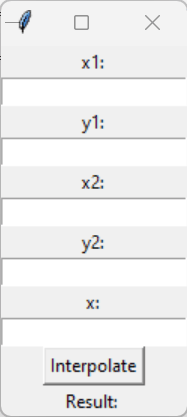
Leave Comments if someone needs a customized GUI of the linear interpolation window.
 Information Sharing Blog
Leave a comment